Reconnaissance optique de caractères
utiliser tesseract (cf infra)
PDF > txt directement avec un script bash linux
requiert tesseract:
sudo apt-get install tesseract-ocr tesseract-ocr-fra
#!/usr/bin/bash
# pdf_ocr2txt
ls *.pdf | while read i
do
	echo "converting pdf file: " $i " to tif file " $i.tif
	convert -density 400 -depth 8 $i $i.tif
	echo "-----"
	echo "Generating txt file " $i.txt
	tesseract $i.tif $i.txt -l fra
done
tesseract
http://doc.ubuntu-fr.org/tesseract-ocr
 convert -density 300 file.pdf -depth 8 file.tiff
 tesseract file.tiff file.txt -l fra
#!/bin/sh
echo "convertit un document pdf et réalise une reconnaissance optique de caractères"
echo "entrer le nom du fichier"
ls *.pdf
read fichier
echo "combien de pages?"
read npages
PAGES=$npages # set to the number of pages in the PDF
SOURCE=$fichier # set to the file name of the PDF
OUTPUT=$fichier.txt # set to the final output file
RESOLUTION=600 # set to the resolution the scanner used (the higher, the better)

#xpdf-pdfinfo pamphlet-low.pdf | grep Pages: | awk '{print $2}' | tail -n 1

#touch $OUTPUT
for i in `seq 1 $PAGES`; do
    convert -density $RESOLUTION -depth 8 $SOURCE\[$(($i - 1 ))\] page$i.png
##    tesseract page$i.tif >> $OUTPUT
    tesseract page$i.png $OUTPUT$i -l fra
done
Liens
- https://azlinux.fr/tesseract/|Comment utiliser Tesseract pour extraire du texte à partir d'images
marche nickel!
GUI
Si on veut pas s'embêter avec la ligne de commande (et avec les formats de fichiers…)
sudo apt-get install gimagereader
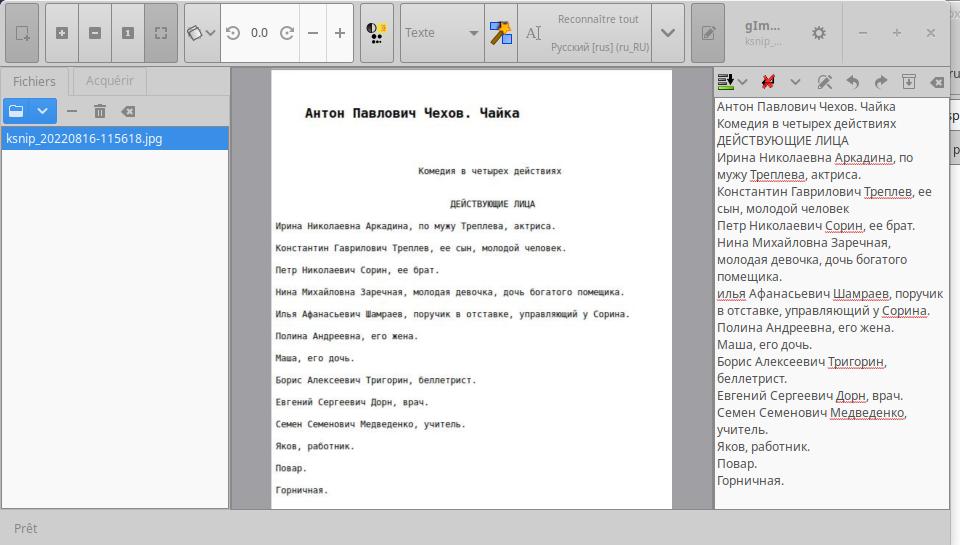
si on veut du russe il faudra installer le dictionnaire
sudo apt install hunspell-ru
et bien sûr le dico français si vous ne l'avez pas déjà
sudo apt install hunspell-fr
Russe
mv rus.traineddata /usr/share/tesseract-ocr/4.00/tessdata/
Ou encore plus simple
sudo apt-get install tesseract-ocr-rus
exemple de script bash pour le russe
#!/usr/bin/bash
# ocr-ru: convert (optical character recognition) jpg russian voc to text/csv file
# usage: ocr-ru then translate it and drill it with anki
# copyleft radeff.red - use it at your own risk!
ladate=$(date +'%Y%m%d')
echo "ocr which russian image?"
ls *.jpg
read i
convert $i $i.png
tesseract $i.png $ladate -l rus
rm $i.png
echo "conversion ok, edit "$ladate".txt now"
#delete empty lines
sed -i '/^$/d' $ladate.txt
#delete line with only spaces
sed -i '/^ *$/d' $ladate.txt
#delete end line with strange char from whatsapp
sed -i '/^$/d' $ladate.txt
mv $ladate.txt $ladate.csv
geany $ladate".csv"&